
If you’ve ever tried to reconstruct a full year of attendance records the week before a filing deadline, or spent an evening erasing and re-writing handwritten lessons in a planner, you know homeschool record-keeping can turn into its own part-time job.
That’s exactly the kind of mess Homeschool Curriculum Planner (HSCP) was built to clean up.
And here’s the fun part: for a name that basic, this planner is anything but ordinary.
Disclosure: I was compensated for writing this review along with full access to Homeschool Curriculum Planner to try it out for myself. All opinions shared here are my own, based on my honest experience using the planner.
Note: This post contains affiliate links, which means I receive a small commission (at no extra cost to you) if you make a purchase using the link. Please see my disclosure for more details.

What is Homeschool Curriculum Planner?
Homeschool Curriculum Planner launched in 2026, created by Sara and her husband Josh, the team behind Blessed Homeschool and Techie Homeschool Mom. If those names are already familiar to you, you probably know their track record for building genuinely useful tools for homeschool families.
Homeschool Curriculum Planner is their newest one, and it brings some features and a pricing structure you won’t find anywhere else in the digital planner space.
Keep reading for a full look at what it does, how it works, and whether it might be the right fit for your homeschool.
First impressions
Homeschool Curriculum Planner (HSCP) is overall a very impressive digital homeschool planner that will easily compete with the others on the market today. It’s generally straightforward to use, letting you do all you’d likely need to do and more. From basic lesson planning to attendance tracking to transcripts.
When I first logged in and got a feel for the basics, I was able to jump in and start entering info fairly quickly.
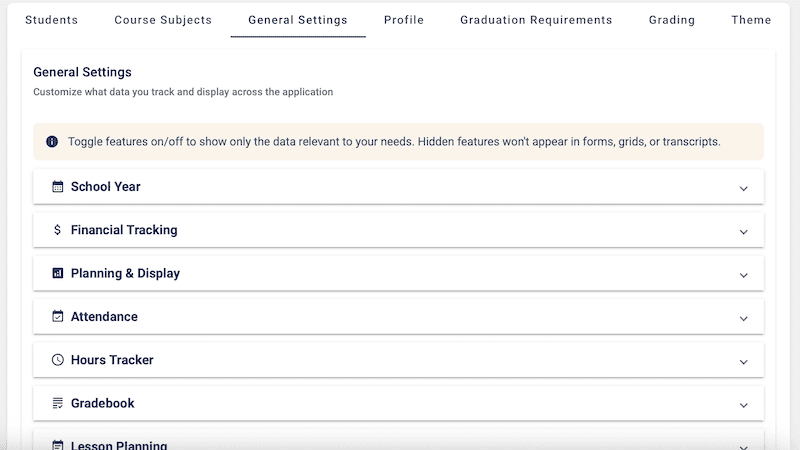
One key thing to understand: settings for every part of the program live under the Settings tab. There were several times I went looking for a way to change something within a page and found it under Settings instead. So if you can’t find what you’re looking for, check there first.
As of this writing, HSCP is still quite new, so I expect it’ll continue to be adjusted and expanded over the next couple of years. I’m hoping the lesson planner and transcript areas see some more robust features before long, but even now, they’re genuinely useful.
A couple of standout pieces, the hours tracking add-on and the planning grid, are worth a closer look, which we’ll get to below.
Between the value and the unique features, HSCP is one worth considering if you’re in the market for a digital planner.
Getting started
Once you’ve set up your basic account, upgraded to Pro, and purchased any add-ons you want, it’s time to get started figuring out how to use the program.
The first time you open any part of the program, you have the option to take a short tour of its layout and usage, which is incredibly helpful for getting the basics down quickly.
First things to do: enter your basic student info, then go through all the settings for each part of the planner you have access to. Once those are in place, you’re ready to work. Enter big-picture plans in the planning grid, create reports as needed, and log activities. With the Pro plan, you can even print reports.
It is a bit overwhelming to get started, since there’s quite a bit of information to enter across a number of areas, depending on which add-ons you’re using. Plus the learning curve for the platform. But all that is to be expected.
The most time-consuming part is the lesson planner. It’s an optional add-on, but many would consider it essential. It’s where you enter detailed daily plans by subject and child, and it’s the piece that ties your day-to-day work to the rest of the system.
The lesson builder helps you quickly create templates for the lessons, which shortens the process once you’ve got a pattern down.
If you run into trouble anywhere, there’s customer service contact info as well as a library of video tutorials to help walk you through different parts of the program.
Hopefully working through the sections and add-ons below will give you a head start on learning the program, so be sure to keep reading!
For more digital planning tools, be sure to check out this post — 17 homeschool planners: Digital edition
Key features
- Student Profiles – Manage detailed academic profiles for each student, including records from K-12.
- Course & Curriculum Tracking – Track every course, its credits, grade level, and category across all years.
- GPA Calculations – Automatic weighted and unweighted GPA calculation with customizable grading scales. Real-time transcript summaries.
- Graduation Requirement Tracking – Monitor progress toward state, honors, and NCAA graduation requirements with built-in or custom templates.
- Planning Grid (Pro) – Multi-year drag-and-drop planning grid for visualizing and organizing your full academic journey.
- Professional Transcripts (Pro) – Generate printer-ready PDF transcripts and detailed course description documents for college applications. Available on Pro accounts.
- Parent Dashboard – At-a-glance overview of all your students. See GPA trends, graduation readiness, and progress alerts in one place.
- Curriculum Cost Tracking – Track curriculum costs per student and year. Identify reuse opportunities and see total academic spending at a glance.
- Multi-Student Support (Pro) – Support up to 12 students per Pro account, with individual records and progress tracking for each.
- Attendance (Add-on) – Log school days with a tap or drag across the calendar, then switch to Week, Month, or Year view to see it all at a glance.
- Hours Tracker (Add-on) – Log minutes by subject and watch your annual and core-hour goals fill in automatically, with a clean report ready when a filing’s due.
- Gradebook (Add-on) – Assignments, averages, and final grades live right on the course card, flowing straight into the transcript.
- Lesson Planning (Add-on) – Three connected tools, the Lesson Plan Builder, Lesson Planner, and a student-facing portal view, that tie your whole curriculum workflow together and sync with grades and hours automatically.
For all you need to know about homeschool planners, including paper, digital, and record-keeping options, be sure to check out this post — The Ultimate Guide to Homeschool Planners: Paper, Digital, and beyond
Walkthrough of the main parts
There are several parts to the Homeschool Curriculum Planner, so I will walk you through each piece individually and hopefully you will see how they work together so well.
Basic Free and Pro Versions
When you first set up an account for the Homeschool Curriculum Planner, you will be given access to the free version of the planner. This, of course, is fairly basic, but still has some unique features, most notably the planning grid. More on that below.
For more features, you must first upgrade your plan to the Pro version, which is a one-time fee. Then you can choose which add-ons you would like to use and purchase those as well. All of those add-ons are also a one-time fee.
Features included in the free version:
- 1 student profile
- 12 built-in subjects
- Basic cost tracking
- Multi-view planning grid
- Course management
- Basic graduation credit tracking
- Activity tracking
Features included in the Pro version:
- Everything in free
- Up to 12 students
- Add custom subjects
- Resource cost tracking
- Weighted GPA calculations
- PDF generation
- Theme customization
- Add-on marketplace access
Add-ons
With the Pro version of the Homeschool Curriculum Planner, you have access to the HSCP add-on marketplace, where you can purchase other optional parts of the planner. This is where you really start getting the full functionality of the planner.
This ability to customize the planner to your needs, buying only what you’ll actually use, is a standout aspect you won’t see in other planners on the market, and it’s one of my favorite parts of this program.
Here are the current options within the add-on marketplace, with the possibility of more in the future:
- Attendance Tracker
- Hours Tracker
- Gradebook
- Lesson Planning
Dashboard
The dashboard section is a basic summary of information from other areas and provides a quick student overview for referencing info quickly. Included here is a quick glance at attendance, GPA, graduation progress, credits earned, as well as a quick link to your resource list and more.
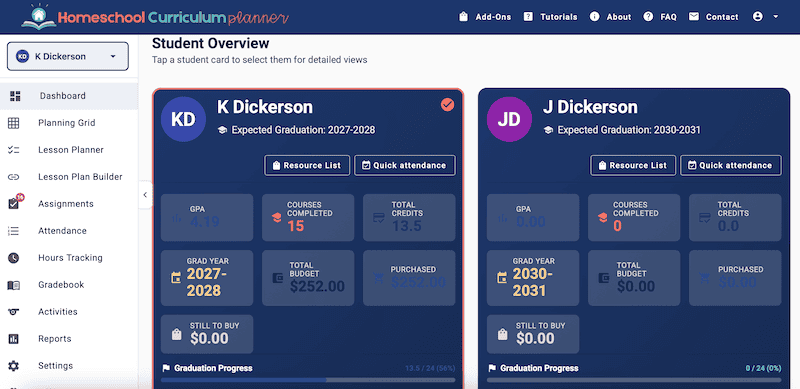
With certain add-ons, your settings can prompt reminders within this dashboard. Reminders for things like tracking attendance or marking off assignments may pop up here upon logging in, if desired.
Planning Grid
The planning grid may be my favorite part of the Homeschool Curriculum Planner. Perhaps because it’s a piece other planners don’t have. Or maybe it’s just because it’s a concept I actually write out and reference on paper every year for my kids.
The idea behind the planning grid is basically that you enter all of the classes/subjects for each child and each grade level. It’s like a big-picture overview of what your child’s homeschool looks like from start to finish, K-12. If things change, you can just drag and drop that class to a different year or edit as needed.
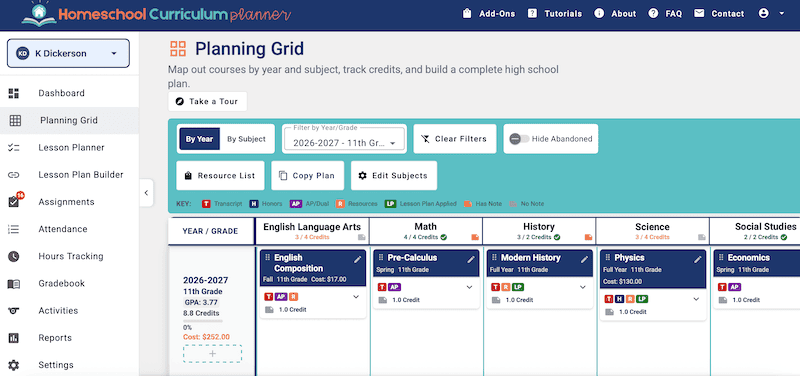
I particularly like this for planning out the high school years. With certain classes to accomplish by graduation, it’s nice to have a place to map out what your child will do each year, and of course what they’ve already completed.
The planning grid also allows for tracking of credits, grades, resources, cost, and more when setting up classes, though some of this requires upgrading to Pro. While your family’s graduation requirements are set up in settings, you can track and place them within this planning grid and the dashboard.
One thing I hope to see with the grid in the future is being able to view my kids’ plans side by side, but this is a very minor thing, as switching between children’s grids is honestly so simple!
Honestly, this planning grid is worth the cost of the Pro version alone, even if you don’t buy anything else. Though the basic planning grid is actually included free, since the free tier covers one student.
I personally love being able to see the big picture like this planning grid allows, and to my knowledge, you won’t find this in any other program.
Activities
The activities section is where you log all the extra things your kids are doing outside of core schoolwork, like achievements, community service, and work experience. There’s also space here to log field trips and books read.
The best part is that this entire section is included at any level, free or Pro. The main difference is that the Pro version allows you to print the lists you enter here.
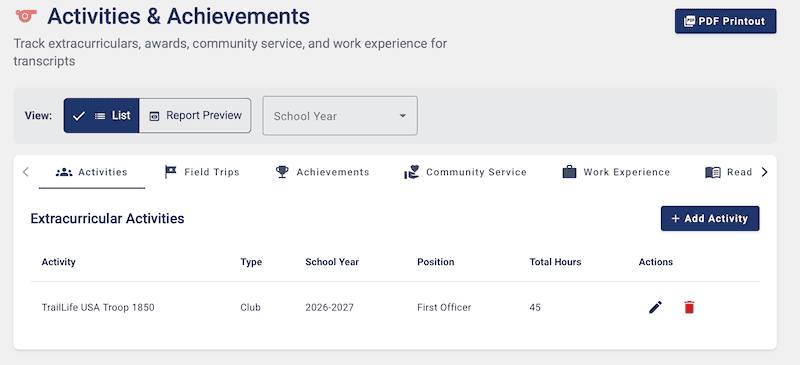
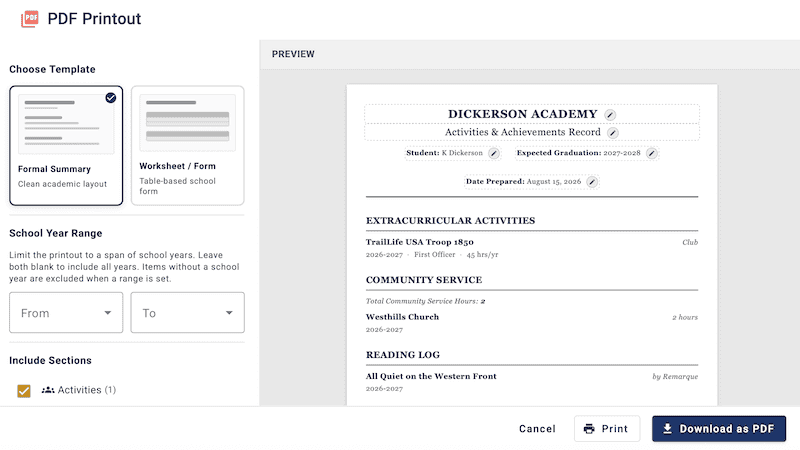
For high schoolers, this section can be particularly important for keeping track of those achievements, since they’re often compiled into a resume or portfolio that’s sometimes requested alongside the high school transcript.
HSCP helps you keep these things in good order. With the Pro version, you can also create a customized PDF version of all this info, ready to send.
Reports
The Reports section of the Homeschool Curriculum Planner is where you can create and print PDFs of report cards, transcripts, completed work list, attendance and hours summaries, and more. This section is only available with the Pro version, and the add-ons you’ve purchased will affect what you can use and view as well.
All the information is pulled from other parts of the system, depending on what’s entered. But within the reports section, you have good ability to customize what you’d like to include on the PDFs, like which sections, years, and so on.
I experienced a couple of issues with the transcript, but these were likely bugs in the program. I contacted customer service, and they were resolved quickly.
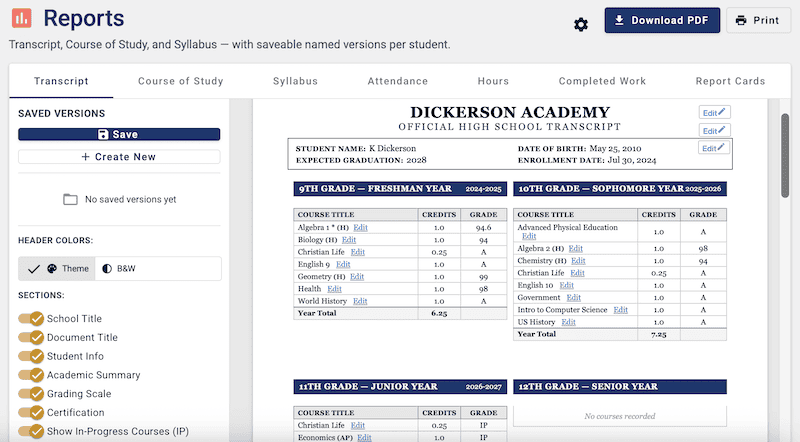
The transcript design is very nice and will look great to any college. It is customizable and you can easily include or exclude any section you would like.
Attendance Tracker
The attendance tracker paid add-on within the Homeschool Curriculum Planner is honestly quite robust. This isn’t just a basic calendar with checkmarks, which is what makes it worth the add-on price.
The attendance tracker allows you to not just track your days, but mark them as days you school at home or away (some states require this differentiation), as well as track a default number of hours each day, if desired.
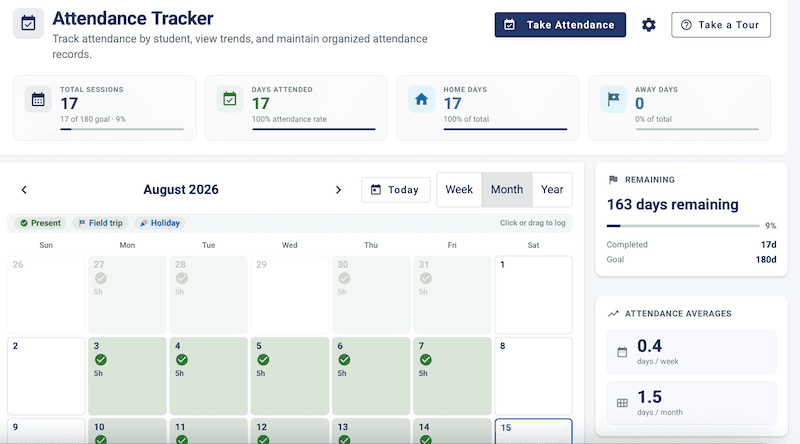
When initially setting up the program, you’ll set your general homeschool year dates in settings. This can be much broader than you actually plan to use. Then you’ll set your goal amount of days, if desired.
Once those are set, the attendance tracker will let you mark your kids as present within those dates. It can even prompt a reminder to track attendance within the dashboard upon logging in.
Then you track each child’s attendance throughout the school year on the calendar, and the program will track total days completed, total days remaining, weekly/monthly averages, home/away days, and more. You can also easily track attendance separately for each child.
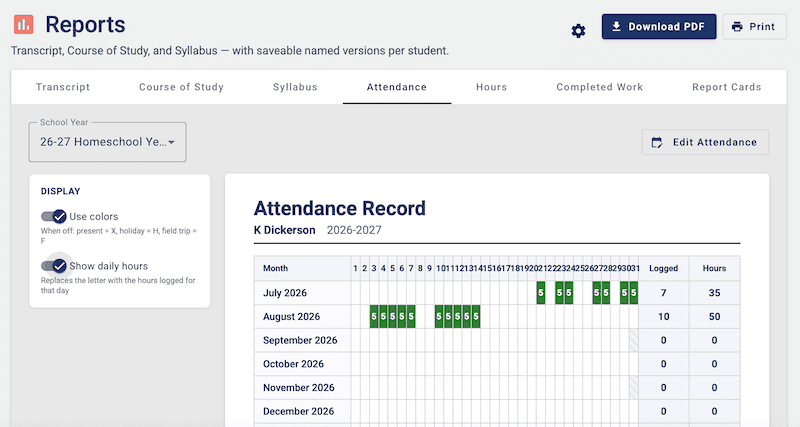
If you’d like a summary PDF of all the info from the attendance tracker, one can be created and printed within the reports section.
Hours Tracker
The hours tracker paid add-on within the Homeschool Curriculum Planner is a section you’ll be hard-pressed to find in another planner. Most planners easily track days, but hours? That’s rare.
Some states require parents to track actual hours of homeschool work, and even require noting whether the hour was completed on core subjects, at home, or away. This tracker is worth every penny if you live in a state that requires this level of tracking!
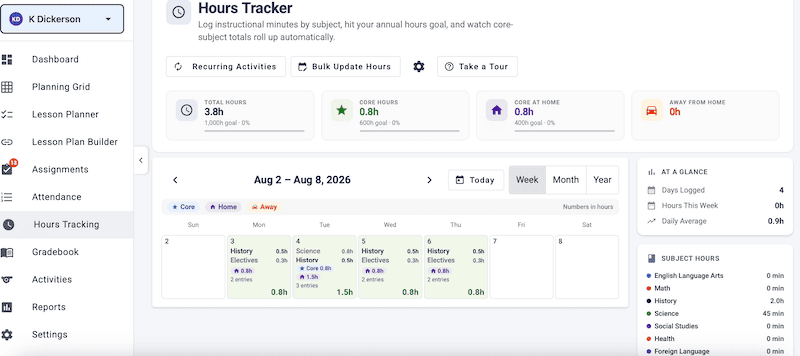
Within settings, you can set up your hour goals for the year, annually, within core subjects, and at home.
You can set default hours for each subject to use with certain add-ons, so when an assignment is completed, it will automatically calculate that default time for hour tracking. Otherwise, hours can easily be entered manually each day. You can also set hours to auto-log on specific days each week, if desired.
So once again, HSCP has simplified a complicated legal reporting requirement.
Gradebook
The gradebook paid add-on within the Homeschool Curriculum Planner is a great addition to the planning system. It’s not only a place to keep all the daily/weekly grades for your students, but it will notify you of anything ungraded or overdue, and calculate a customized weighted grade and GPA.
The gradebook allows you to choose which courses you want to grade and hide the others. You can input customized assignment types for each class/subject, then assign percentages of the final grade to each assignment type, producing a weighted final grade for the course.
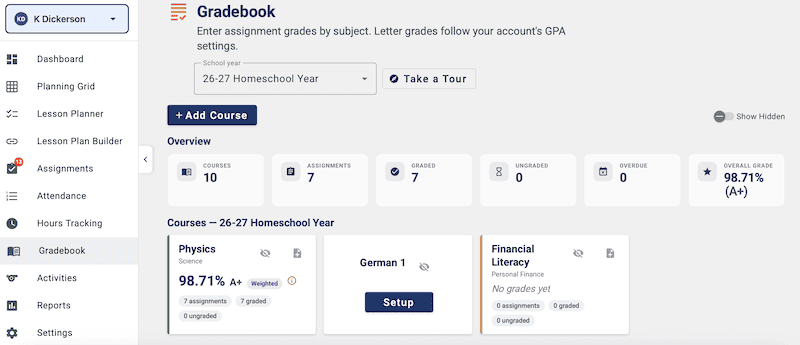
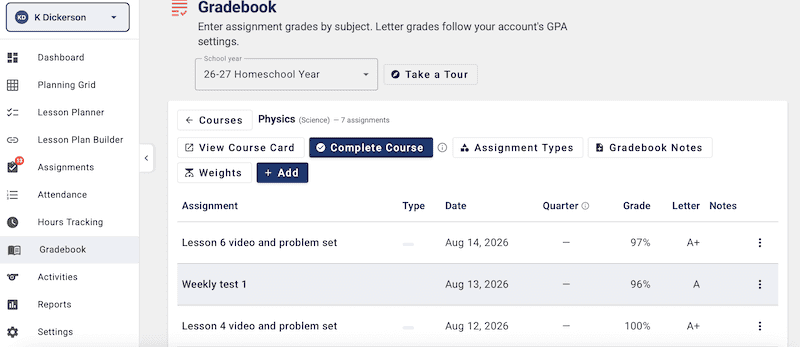
The Pro version of HSCP already allows customizable grading scales and a weighted overall GPA across all courses. The gradebook add-on takes this a step further by letting you weight assignment types within each individual course, bringing grading to the next level.
Lesson Planner/Builder
The Lesson Planning add-on for the Homeschool Curriculum Planner is the largest and most expensive section of the program. This is the part of the planner that many would consider the heart of the system, though it’s an optional add-on.
The lesson planner is where you input your students’ actual assignments into a daily calendar. You enter assignments for each student, subject, and course, then assign them to certain days. Once entered, you just check them off when completed. The program can also track default hours for each subject, if desired.
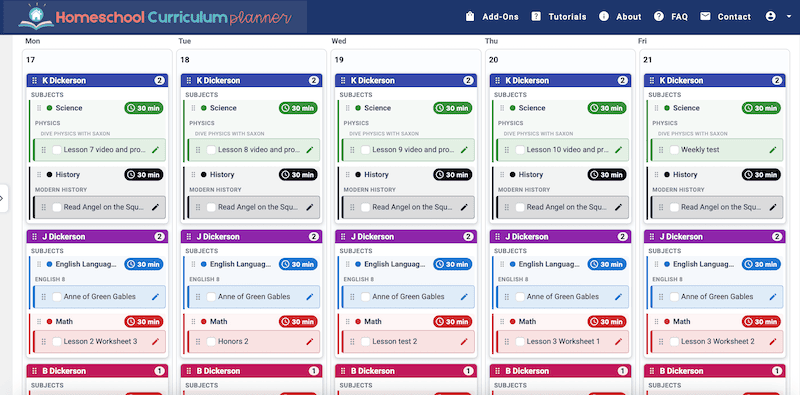
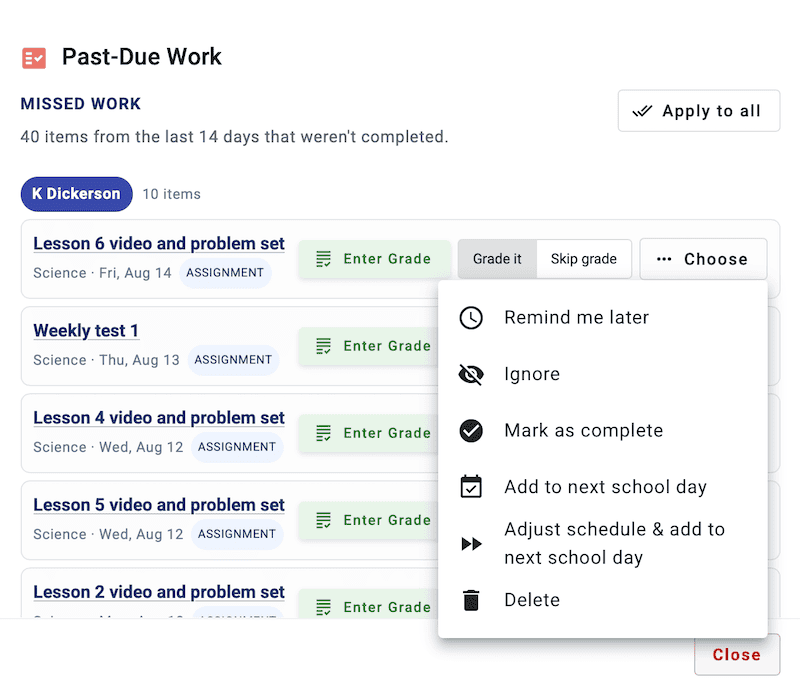
If the day an assignment was assigned has passed, the system can notify you of any past-due assignments to prompt checking them off. You can also easily move assignments to a different day by dragging and dropping.
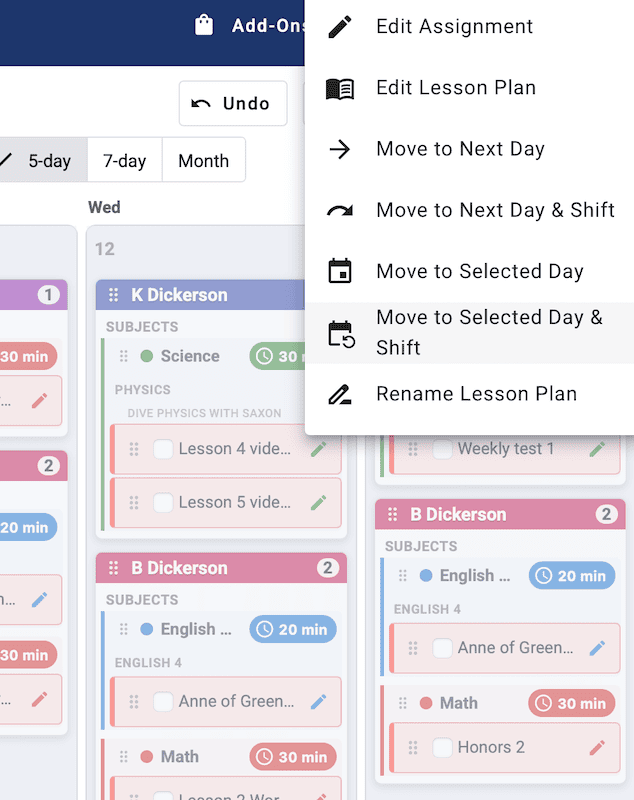
If you want to move not just that one assignment, but all the following assignments within that course/subject, you can do so by editing the subject plans and selecting the action desired. This way, you don’t have to manually move each assignment.
If you’re someone who likes to plan in advance, you may want to enter a full year’s curriculum all at once, or at least a few weeks. That, of course, would take forever if you’re entering assignments individually for each subject and each child.
This is where the lesson plan builder comes in. With this tool, you can create a basic lesson plan template within one window that’s saved in the system. When it’s ready, you apply the template to the calendar at whatever point in the year you desire.
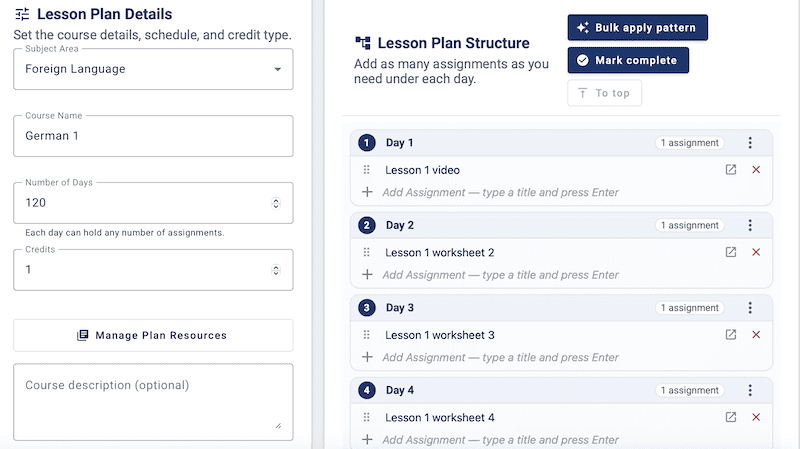
The lesson plan builder also has a great tool to simplify this process even further: the bulk apply pattern tool lets you create and input patterns that apply to the lesson plan. It’s a game-changer.
For instance, you can tell it you want 100 lessons, labeled “Lesson 1, Lesson 2, Lesson 3,” and so on, with a quiz added every fifth lesson. It maps all of this out for you within your lesson plan template.
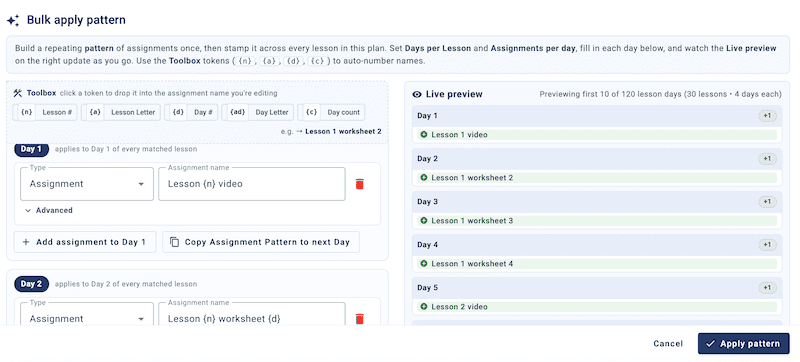
Using the builder greatly reduces the typing for each lesson plan, and saving templates lets you reuse them in the future, whether for a similar program or for another child.
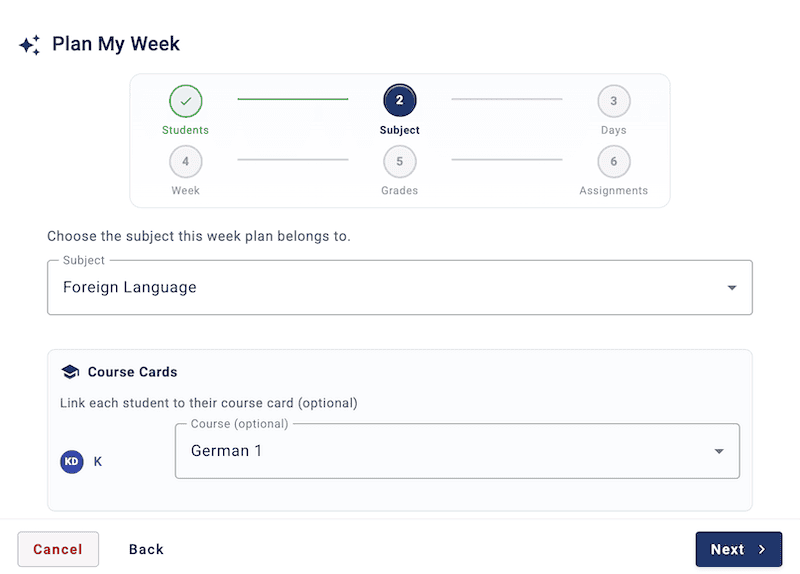
Another feature I liked is the “Plan My Week” tool. This is helpful for those who plan week to week, or for shorter assignments you want to add here and there. Within this window, you can easily add assignments for the week for one or multiple children, choose the subject they fit within, and set the days they should be done, all in one simple window.
Planning, of course, isn’t just for parents. Older kids can generally track their own assignments, and HSCP gives your children this ability in two ways.
The first option is to create and print a PDF version of the planner, a checklist that looks similar to the online version, generated directly from the lesson planner view. Simple.
The other option is a separate student portal for each student. Once you’ve set up the portal and assigned lessons in the planner, your student can view them within their own portal. See below for more info on the student portal.
If you give your children the ability to check off their own assignments, or even if you’re checking them off yourself, you can choose to have certain assignments require your review. This can be a helpful way to remind yourself to check or grade your student’s work and provide that accountability. This is set up in the Lesson Planning settings.
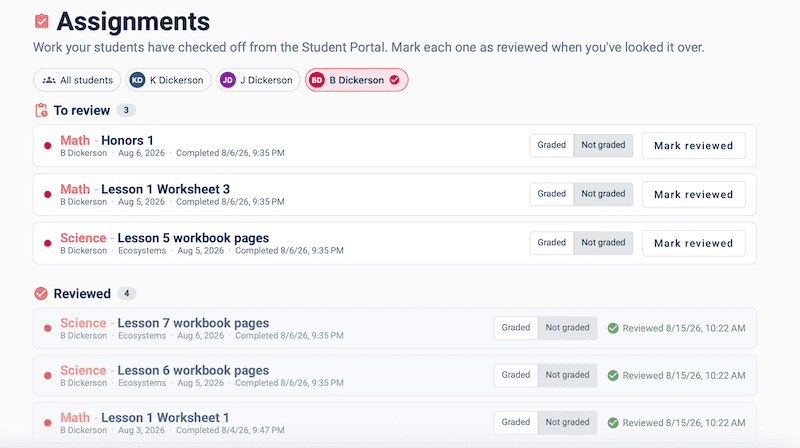
With multiple kids and several subjects each, the lesson planner can get full and cluttered quickly, so you’re able to view only one student at a time.
If you’ve ever written assignments into a paper planner, only to come back a few days later and cross them out to rewrite them on another day, you’ll understand how helpful a digital planning tool like this can be. HSCP has made this work quite well, and I look forward to seeing how it becomes even more capable in the years to come.
Student Portal
If you’ve purchased the Lesson Planning add-on, you have the ability to create a student portal for your kids. You’ll need to set this up yourself, in the student profiles.
This portal gives your student their own personal log-in to view assignments and check them off. The portal view is incredibly simple and allows you to turn several options on or off, all changed within the student profiles under settings.
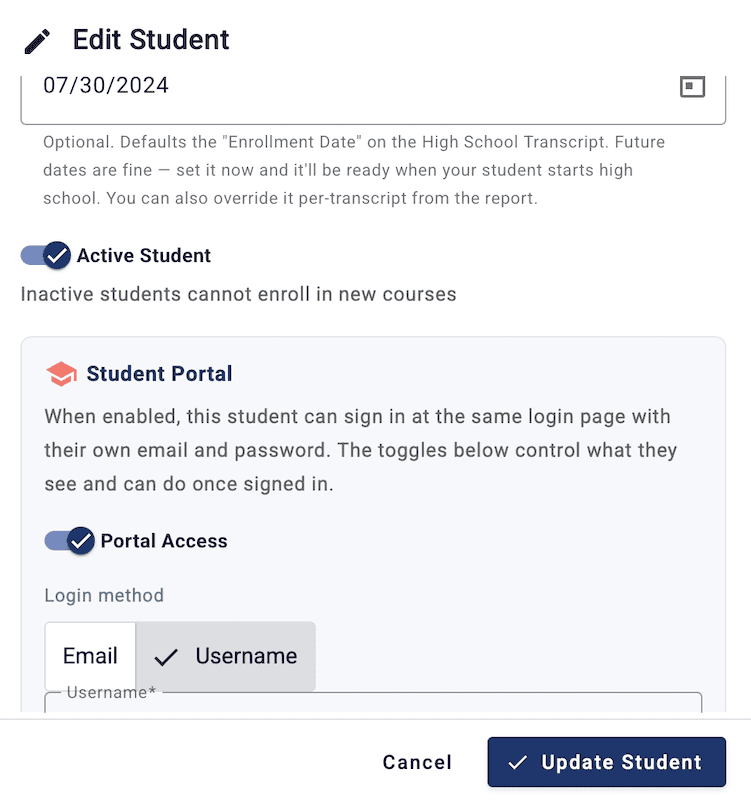
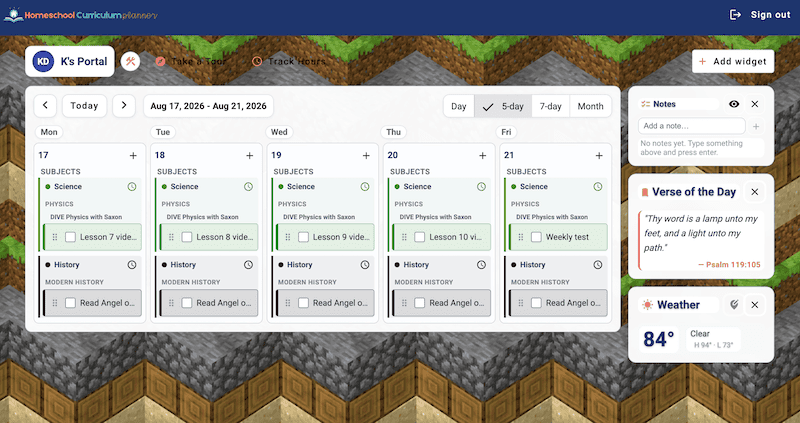
Options you can allow within the student portal include marking off assignments, moving assignments, tracking attendance/hours, planning their week, and adding other simple widgets like time and weather.
I love the simplicity and customization of this student portal. It really can help give some independence and autonomy to your older children, while letting you choose how much, and what they’re ready for.
What makes HSCP different
There’s no shortage of homeschool planners out there, but a few things set Homeschool Curriculum Planner apart from the rest of the pack.
✅ The pricing structure
Most digital planners run on a subscription, charging you year after year for as long as you use them. HSCP flips that. You pay once for Pro, then choose only the add-ons your family actually needs, also as one-time purchases.
Stick with it for even a couple of years, and it works out cheaper than most subscription-based options, all while letting you build the system piece by piece as your budget allows.
✅ The Planning Grid
This might be the single most unique feature of the whole program. Instead of planning one year at a time, the Planning Grid lets you map out your child’s entire K-12 journey in one big-picture view, dragging and dropping classes between years as plans change.
I haven’t seen this kind of long-view planning tool built into any other homeschool planner, and if you’re navigating high school requirements, having that full path laid out in one place is genuinely valuable.
✅ Hours tracking that actually works
Plenty of planners track attendance days, but very few track instructional hours, and fewer still let you break those hours down by core subject or home vs. away, which is exactly what some states require. If you live in a state with hour-based reporting, this add-on alone can save you from a scramble come filing time.
✅ Real customization, not just themes
Between the à la carte add-ons and the Lesson Plan Builder’s bulk apply pattern tool, HSCP lets you shape the system around how your family actually homeschools, rather than forcing everyone into the same workflow.
You can build out a simple free-tier setup for one child, or a fully loaded Pro-plus-every-add-on system for a large family managing multiple transcripts. Few planners offer that much range within a single program.
Put together, these pieces make HSCP feel less like a one-size-fits-all tool and more like a system you build to match your own homeschool.

Pricing
One thing that sets HSCP apart is its pricing structure. You only buy the parts of the system you actually want, and most of those purchases are one-time rather than subscriptions.
Pay once, and you can use that piece of the program with all your kids for years to come, updates included, since it’s all part of the same online program.
Right now, you start with the Pro version at $27, then add on whichever pieces fit your family. Three of the four current add-ons (attendance, hours tracking, and gradebook) are also $27 each as a one-time purchase.
The Lesson Planner is the exception, it’s a much more robust add-on, so it costs more upfront ($167), and it’s the only piece that also offers a subscription option ($7/mo.), given how high that lifetime cost is.
I really like this approach. It keeps costs low over time, and lets you build the system piece by piece as your family needs and budget allow, rather than paying for a bunch of features you won’t use.
The upfront cost can feel like a lot at once, especially if you’re adding several pieces. For comparison, another popular planner charges an amount similar to Pro plus a couple of add-ons here, but they charge that every year, while HSCP charges it once.
So if you’re unsure whether HSCP is the right long-term fit, that upfront cost is worth weighing. But if you stick with it for even a couple of years, it works out cheaper than most other planners on the market.
For everything you get, I think HSCP offers great value, and I’m looking forward to seeing where it goes from here.
Pros & Cons
Pros
- Planning Grid: the K-12 big-picture view is genuinely one of a kind, and worth the Pro upgrade on its own.
- Hours Tracker: a rare feature that makes state hour-reporting requirements simple instead of stressful.
- Gradebook: weighted grading down to the individual course, flowing straight into your transcript.
- Student Portal: gives older kids real independence with their own login, while letting you control exactly how much autonomy they get.
- Lifetime pricing: pay once per piece and use it for years, no recurring charges eating into your homeschool budget.
Cons
- No app: everything currently runs through a browser, so if you’re used to a dedicated mobile app for on-the-go planning, that’s not here yet.
- Upfront cost: since most pieces are one-time purchases rather than small monthly payments, the initial cost of Pro plus add-ons can feel like a lot all at once, even though it pays off over time.
- Still new: as a 2026 launch, it hasn’t had years to build out every feature the way some longtime competitors have. It’s not far behind, and Sara and Josh are actively developing it, but a few areas (like the lesson planner) may see more polish added over time.

HSCP might be for you if…
- You prefer planning digitally over paper and like having everything in one system.
- You have a high schooler and need an easy way to track credits, GPA, and graduation requirements.
- You want a place to log activities, achievements, and field trips alongside your academic records.
- You’re tired of paying a subscription fee year after year and would rather pay once and be done.
- You love seeing the big picture — the Planning Grid alone could be worth it if you like mapping out your child’s whole K-12 path.
- You live in a state that requires hour-based reporting, not just attendance days.
- You want to build your own system, buying only the pieces you’ll actually use instead of paying for a bunch of features that don’t fit your family.
- You have older kids who are ready for some independence in tracking their own assignments.
- You don’t mind being an early adopter, and you’re excited to grow alongside a newer program as it continues to develop.

HSCP may not be the best fit if…
- You prefer keeping things simple with paper and pencil, or don’t want to learn a new digital system.
- You have only younger kids and don’t need transcript, credit, or GPA tracking yet.
- You need a dedicated mobile app for planning on the go.
- The upfront cost per piece feels like more than you can commit to right now, even knowing it’s cheaper long-term.
- You’d rather use a more established, fully mature system with years of added features behind it.
- You’re not looking to piece together add-ons and would rather have everything included in one flat plan.
Do you prefer paper planners? Be sure to check out this post about all the best paper homeschool planners — 23 Planners for Homeschoolers: Paper Edition
Homeschool Curriculum Planner
Overall, Homeschool Curriculum Planner has genuinely impressed me. Between the pay-once pricing, the ability to buy only what you need, and that big-picture planning grid I keep coming back to, it brings something different to a space that can otherwise feel pretty crowded with subscription-based lookalikes.
It’s still young, and there’s room for it to grow, but Sara and Josh have built something worth paying attention to right out of the gate.
If you’re looking for a digital planner that lets you pay once, use it for years, and shape it around exactly what your family needs, HSCP is well worth a look. There’s no one-size-fits-all planner for every homeschool, but this one comes closer than most.
Related posts
The Ultimate Guide to Homeschool Planners: Paper, Digital, and beyond
The Best homeschool planner you haven’t heard about (yet)!
17 homeschool planners: Digital edition
23 Planners for Homeschoolers: Paper Edition


The one-time fee per add-on model instead of a recurring subscription is what would actually get me to try this over the other digital planners. Most of those nickel-and-dime you every year.
Yes! 100%! I love that part about this planner!